Is your Mazda key acting up or not working at all? The most common reason is a dead battery.
Changing the battery might sound tricky, but it’s easier than you think. In this guide, you’ll learn exactly how to replace your Mazda key battery quickly and safely. Keep reading to save time, avoid costly trips to the dealer, and get your key working like new again.

Credit: www.youtube.com
Signs Of A Weak Mazda Key Battery
Knowing the signs of a weak Mazda key battery can save time and frustration. A failing battery affects your key’s performance. It may stop working at the worst moments. Watch for clear signals that your key needs a new battery soon.
Reduced Remote Range
The remote range shrinks when the battery weakens. Your key won’t work from as far away as before. You might need to stand closer to your car. This change happens gradually. It shows the battery is losing power.
Unresponsive Buttons
Buttons on the key stop responding well. Pressing lock or unlock may do nothing. Sometimes the key works only after several tries. This happens because the battery can’t send strong signals. It is a clear sign to check the battery.
Warning Indicators
Your Mazda may show alerts on the dashboard. These warnings hint at key battery problems. Look for messages about the key or remote. Some models flash a key icon to warn you. These indicators mean you should replace the battery soon.
Credit: batteriesstore.ca
Tools Needed For Battery Replacement
Changing the battery in your Mazda key requires a few simple tools. Having the right tools makes the process quick and easy. It also helps avoid damage to your key.
Below are the main tools and battery type needed for replacement. Keep them ready before starting.
Type Of Replacement Battery
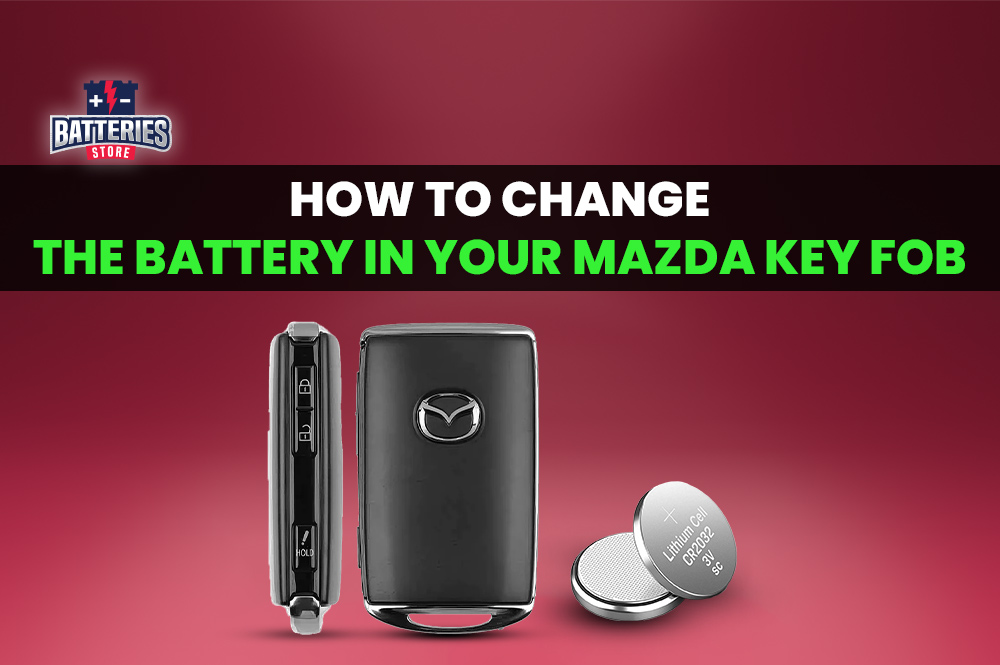
Mazda keys usually use a CR2025 or CR2032 battery. Check your key’s manual or open the key to see the battery type. Using the correct battery ensures proper key function and longer life.
Basic Tools Required
You need a small flathead screwdriver or a coin to open the key case. A clean cloth helps hold the key and avoid scratches. Sometimes, tweezers can assist in removing the old battery safely. These basic tools make the replacement smooth and safe.
Step-by-step Battery Replacement
Replacing the battery in a Mazda key is simple and quick. This guide breaks down each step clearly. Follow the instructions carefully to avoid damage. You only need a small screwdriver and a new battery. Let’s get started with the process.
Opening The Key Fob
Hold the key fob firmly in one hand. Find the seam along the edge of the fob. Use a small flat-head screwdriver to pry it open. Work gently to avoid cracking the plastic. Once loosened, separate the two halves of the fob.
Removing The Old Battery
Inside, locate the round battery. Note its position before removal. Use the screwdriver or your fingernail to lift it out. Dispose of the old battery properly. Handle the battery carefully to avoid damage.
Inserting The New Battery
Check the new battery’s type and size match the old one. Place the new battery in the same position as the old one. Ensure the positive side (+) faces up. Press it gently into the slot until secure.
Reassembling The Key Fob
Align the two halves of the key fob carefully. Press them together firmly until they snap closed. Test the key fob buttons to confirm the new battery works. Your Mazda key is ready for use again.
Testing Your Mazda Key After Replacement
Testing your Mazda key after replacing the battery is important. It ensures the key works properly. This step helps avoid problems later on. A quick test confirms the battery fits well and powers the key.
Start by checking all buttons. Then, verify remote functions like start and lock. These checks show if the replacement was successful.
Checking Button Functions
Press each button on the key one by one. Listen for sounds or watch for lights on the car. Buttons should respond without delay. If a button feels stuck or does not work, open the key again. Check the battery position and contacts. Correct any issues and test again.
Verifying Remote Start And Lock
Stand near your Mazda to test remote features. Press the lock button and watch the car doors. They should lock quickly and securely. Try the unlock button next. The doors must open smoothly. Test the remote start by holding the start button. The engine should turn on within seconds. If any function fails, check the battery or key assembly again.
Tips To Extend Battery Life
Extending the battery life of your Mazda key saves time and money. Small habits help your key last longer. Follow simple tips to keep your key working well.
Avoiding Extreme Temperatures
Heat and cold drain your key battery fast. Avoid leaving your key in direct sunlight or freezing places. Keep your key inside pockets or bags. This protects the battery from temperature damage.
Regular Usage Recommendations
Use your Mazda key regularly to keep the battery active. If you don’t use it often, press buttons once in a while. This prevents the battery from losing power over time. Store the key in a dry place when not in use.
When To Seek Professional Help
Changing the battery in a Mazda key is usually simple. Sometimes, problems still occur after you replace the battery. Knowing when to get help can save time and avoid frustration. Some issues need a professional’s tools and skills.
Persistent Issues After Replacement
If the key does not work after changing the battery, the problem might be bigger. The battery may be fine, but the key’s internal parts could be damaged. Dirt or moisture inside the key can cause problems too. A professional can open and clean the key safely. They can also check for hidden damage or broken parts. This helps avoid further problems and extra costs.
Key Programming Requirements
Some Mazda keys need programming after battery change. The car and key must communicate to work properly. Programming requires special devices and knowledge. A professional technician can program the key quickly and correctly. Without programming, the key may not start the car or unlock doors. Professionals ensure the key matches your car’s system exactly.

Credit: www.marinmazda.net
Frequently Asked Questions
How Do I Know When To Change Mazda Key Battery?
You may notice weak signals, slow response, or no function. The key might also have a blinking light. These signs indicate a low or dead battery that needs replacement.
What Type Of Battery Does A Mazda Key Use?
Mazda key fobs commonly use CR2032 lithium coin batteries. Always check your specific model’s manual to confirm the correct battery type before purchasing.
How Can I Safely Open My Mazda Key Fob?
Use a small flat-head screwdriver or a coin to gently pry open the key fob. Avoid using excessive force to prevent damage to the casing or internal components.
Can I Replace The Mazda Key Battery Myself?
Yes, replacing the battery is simple and can be done at home. Just open the key fob, remove the old battery, and insert a new one carefully.
Conclusion
Changing the battery in your Mazda key is simple and quick. Open the key carefully and remove the old battery. Place the new battery the right way to avoid issues. Test the key to make sure it works well. Regular battery checks keep your key working smoothly.
This small task saves time and avoids frustration later. Now, you can handle the battery change yourself with confidence. No need to visit a dealer or wait for help. Keep your Mazda key ready for every drive.