Is your Chevy Equinox radio acting up or not responding as it should? You’re not alone.
Sometimes, a simple reset can bring your radio back to life and save you from frustration. In this guide, you’ll learn easy steps to reset your Chevy Equinox radio quickly and get back to enjoying your favorite tunes and podcasts.
Keep reading—you’ll find clear instructions that anyone can follow, no tech skills needed. Let’s fix your radio together!
Reasons To Reset Chevy Equinox Radio
Resetting the Chevy Equinox radio solves many common problems quickly. The radio sometimes stops working or behaves oddly. Resetting clears errors and restores normal function. Knowing why to reset helps decide the right time to act. A reset is a simple fix that often saves time and money.
Common Radio Issues
The radio may freeze or fail to turn on. Sound might cut in and out during use. Buttons or touchscreen may stop responding. Radio settings can reset on their own unexpectedly. Bluetooth connections may fail to pair or drop. These problems make driving less enjoyable and safe.
When To Consider A Reset
Try a reset if the radio is slow or unresponsive. Use it when Bluetooth won’t connect to your phone. Reset after changing the battery or electrical system. It helps if the radio shows error messages or strange codes. Resetting is a first step before visiting a mechanic. It often fixes issues without professional help.

Credit: www.reddit.com
Preparations Before Resetting
Before resetting your Chevy Equinox radio, save any important settings or presets. Ensure the vehicle is turned off to avoid issues during reset. Keep the radio’s manual nearby for reference.
Gathering Necessary Tools
Before resetting your Chevy Equinox radio, gather all needed tools. Have a small flathead screwdriver ready. This helps to remove panels carefully. Keep a soft cloth nearby to protect surfaces. A flashlight can be helpful in dim areas. Collect these items to avoid interruptions during the reset.
Checking Vehicle Battery
Check your vehicle’s battery status before starting the reset. A weak or dead battery can cause issues. Turn on the engine and note if electrical parts work well. Use a voltmeter to measure battery voltage if possible. Make sure the battery has enough power to support the reset process.
Reset Methods For Chevy Equinox Radio
Resetting the Chevy Equinox radio is often necessary to fix small glitches. Several reset methods work well to restore normal function. These methods vary from simple button presses to more technical resets. Choose the one that fits your situation best.
Soft Reset Via Radio Controls
Press and hold the power button on the radio for about 10 seconds. Wait for the screen to go blank and then restart. This soft reset clears minor bugs without erasing your settings. It is the fastest and easiest reset method.
Hard Reset Using Fuse Box
Locate the fuse box under the hood or inside the vehicle. Find the fuse labeled for the radio or infotainment system. Remove the fuse carefully and wait for 30 seconds. Reinsert the fuse and turn on the radio. This hard reset cuts power fully, fixing deeper issues.
Reset Through Infotainment Settings
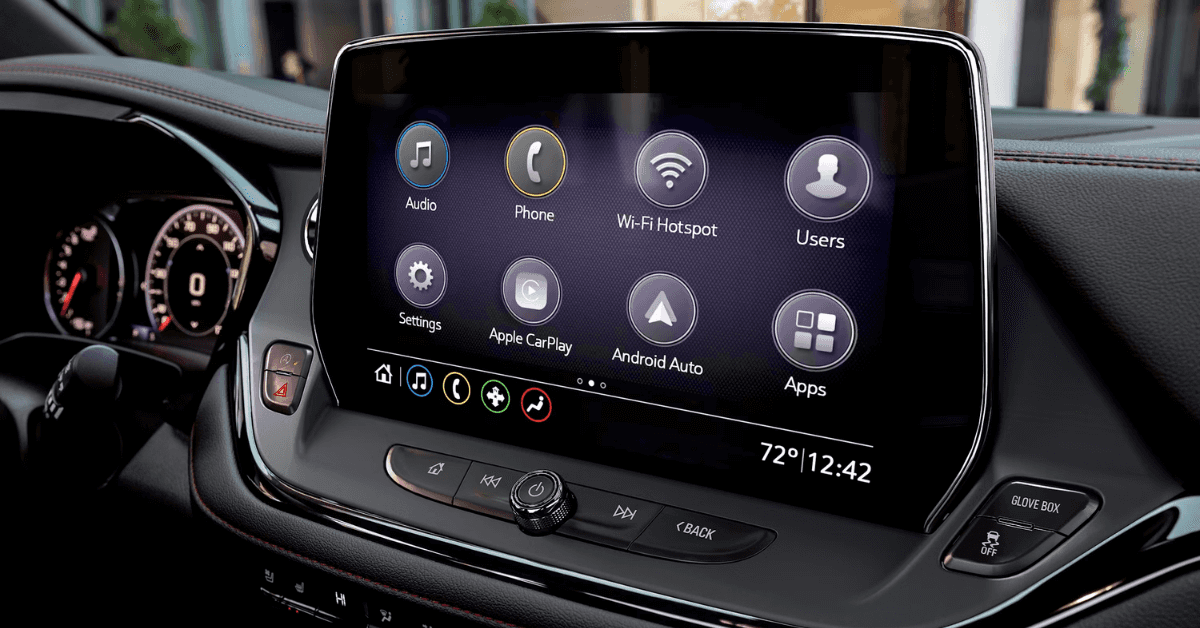
Access the infotainment system’s main menu. Navigate to the “Settings” or “System” section. Look for an option called “Reset” or “Factory Reset.” Confirm your choice to restore the radio to default settings. This method erases personal data but resolves software problems effectively.

Credit: www.youtube.com
Step-by-step Reset Instructions
Resetting the Chevy Equinox radio can solve many common issues. The process is simple and quick. Follow the steps below carefully to reset your radio properly.
This guide covers three reset methods. Each method suits different problems. Pick the one that matches your situation.
Soft Reset Procedure
Press and hold the power button for about 10 seconds. The radio will turn off and on again. This clears minor glitches without erasing your settings. Release the button once the screen goes dark. Wait a few seconds for the system to reboot.
Hard Reset Procedure
Locate the fuse box in your vehicle. Find the radio fuse using the diagram on the cover. Pull out the fuse carefully and wait one minute. Reinsert the fuse to restore power to the radio. This reset clears more serious issues but does not delete saved presets.
Infotainment System Reset
On the radio screen, press the “Settings” icon. Scroll down and select “Factory Reset” or “Restore Defaults.” Confirm your choice to start the reset. The system will erase all personal data and settings. This method fixes complex software problems in the infotainment system.
Troubleshooting Post-reset Issues
After resetting your Chevy Equinox radio, some issues might appear. These problems can be simple to fix. Knowing how to handle them saves time and stress. The next sections cover common post-reset issues and easy solutions.
Radio Won’t Turn On
Sometimes the radio does not power up after a reset. Check the car’s battery first. A low battery can stop the radio from starting. Next, look at the radio fuse. A blown fuse stops power flow. Replace the fuse if needed. Also, try pressing the power button firmly for a few seconds. If still no power, the radio might need professional help.
Loss Of Radio Presets
Resetting often erases saved radio stations. This is normal. You need to set your favorite stations again. Use the preset buttons to save each station manually. Write down your favorite frequencies before resetting next time. This makes reprogramming faster and easier.
Connectivity Problems
Bluetooth or USB may fail to connect after reset. Re-pair your phone or device with the radio. Delete old connections to avoid conflicts. Check if your device’s software is up to date. Sometimes, restarting your phone helps. If problems continue, try resetting the radio again or consult a technician.
Credit: www.applegatechev.com
Tips To Avoid Future Radio Problems
Keeping your Chevy Equinox radio working well saves time and stress. Simple steps help avoid common radio problems. Follow these easy tips to keep your system smooth and responsive.
Regular System Updates
Check for radio system updates often. Updates fix bugs and improve performance. Use your car’s manual to find update instructions. Keep the software current to prevent glitches.
Proper Use Of Radio Features
Use radio controls gently to avoid damage. Avoid pressing buttons too hard or fast. Turn off the radio properly before turning off the car. Handle the touchscreen carefully to keep it responsive.
Frequently Asked Questions
How Do I Reset My Chevy Equinox Radio?
To reset, turn the ignition on and press the power button for 10 seconds. The radio will reboot and clear minor glitches.
Why Does My Chevy Equinox Radio Need Resetting?
Resetting fixes software bugs, freezes, or error messages. It helps restore normal radio functions quickly and easily.
Will Resetting Erase My Radio Presets?
No, resetting usually clears temporary issues but keeps your saved presets and settings intact.
How Can I Find My Chevy Equinox Radio Code?
Check your owner’s manual or contact a dealer with your VIN. The code is needed after a full reset.
Conclusion
Resetting your Chevy Equinox radio is simple and quick. Follow the steps carefully to avoid mistakes. A reset can fix many common radio issues. Keep your vehicle’s manual handy for extra help. Regular resets help maintain smooth radio performance. Now you can enjoy clear sound and reliable controls.
Don’t hesitate to try these easy fixes yourself. Your Chevy’s radio will work like new again. Stay confident with your car’s technology every day.