Seeing Tire Pressure On A Kia Telluride: A Complete Guide
Driving a Kia Telluride should feel safe and easy, but tire pressure problems can quickly ruin your day. Low or uneven tire pressure can cause accidents, damage your tires, or make your vehicle less efficient. Luckily, Kia designed the Telluride with smart systems to help drivers check tire pressure quickly.
If you want to keep your Telluride running smoothly, knowing how to monitor your tire pressure is essential.
This guide will explain how to see tire pressure on the Kia Telluride using its built-in features. You’ll learn step-by-step instructions, common mistakes to avoid, and tips for getting the most accurate readings. Whether you’re new to modern cars or just want to make sure you’re using your Telluride’s technology correctly, this article will give you all the details you need.
Understanding Tire Pressure Monitoring In The Kia Telluride
The Kia Telluride comes with a Tire Pressure Monitoring System (TPMS). This system uses sensors inside each tire to measure the air pressure. When the pressure drops below the recommended level, the TPMS sends a warning to your dashboard.
How Tpms Works
Each tire has a small sensor attached to the valve stem. These sensors send data wirelessly to your car’s computer. If the pressure falls too low, the system triggers a warning light on your instrument cluster. The TPMS is designed to alert you before your tires become unsafe, but it’s still important to check your pressure regularly.
Types Of Tpms Alerts
There are two main alerts:
- General Warning Light: A yellow symbol shaped like a horseshoe with an exclamation mark. This means one or more tires are under-inflated.
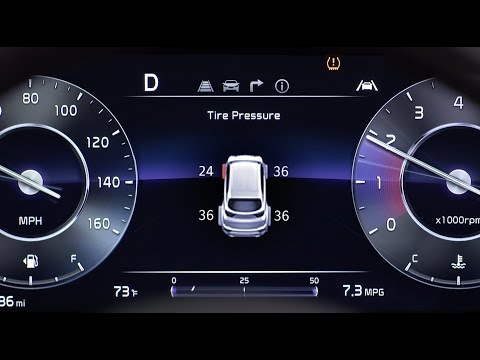
- Specific Pressure Readings: The Telluride’s digital display can show the exact PSI for each tire, making it easier to know which tire needs attention.
Recommended Tire Pressure For Kia Telluride
The recommended tire pressure for most Kia Telluride models is 35 PSI for both front and rear tires. Always check your owner’s manual or the sticker inside the driver’s door for the exact numbers.
| Model Year | Front Tires (PSI) | Rear Tires (PSI) |
|---|---|---|
| 2020 | 35 | 35 |
| 2021 | 35 | 35 |
| 2022 | 35 | 35 |
| 2023 | 35 | 35 |
Step-by-step: How To See Tire Pressure On Your Kia Telluride
Checking tire pressure on your Telluride is easy once you know where to look. Here’s a clear guide for beginners:
1. Start The Vehicle
Turn the ignition to the ON position. The TPMS only works when the car is running, so start the engine or switch to accessory mode.
2. Locate The Instrument Cluster
Look behind the steering wheel. You’ll see a digital screen between the speedometer and tachometer. This is your instrument cluster.
3. Use The Steering Wheel Controls
On the right side of the steering wheel, you’ll find buttons marked with arrows and a “MODE” or “MENU” label.
- Press the MENU button until you reach the “User Settings” or “Information” screen.
- Use the arrow buttons to scroll through the options.
4. Find The Tire Pressure Menu
Look for a menu labeled “Tire Pressure” or a small tire icon. Select this option.
- The screen will show the PSI for each tire. It updates in real time while you drive.
5. Read The Numbers
You’ll see four numbers, one for each tire. If any tire shows a value below 35 PSI, you should add air soon.
| Tire | Recommended PSI | Low Pressure Warning |
|---|---|---|
| Front Left | 35 | <28 |
| Front Right | 35 | <28 |
| Rear Left | 35 | <28 |
| Rear Right | 35 | <28 |
6. What If No Numbers Appear?
If you only see dashes or blank spaces, drive for a few minutes. The sensors need to move to send accurate readings. Cold weather can also delay data. If the display stays blank, your sensors may need service.
Credit: www.reddit.com
Comparing Tpms With Manual Tire Pressure Checks
Some drivers trust the TPMS completely. Others prefer to check tire pressure themselves. Both methods have advantages.
| Method | Accuracy | Speed | Reliability |
|---|---|---|---|
| TPMS Display | Good (±1 PSI) | Instant | High, but can fail |
| Manual Gauge | Very High | 1–2 minutes/tire | Always works |
If you want the most precise results, use both methods. Check the TPMS first, then use a manual pressure gauge to confirm.
Common Mistakes When Checking Tire Pressure
Even with a smart system like the Telluride’s, mistakes can happen. Here are errors many beginners make:
- Checking pressure after driving: Tire heat increases air pressure, making readings higher than actual. Always check when tires are cold.
- Ignoring the TPMS warning: Some drivers keep driving after the warning light comes on. This can cause tire damage.
- Failing to calibrate after changing tires: If you replace a tire, the TPMS may need reset. If not, it may show wrong numbers or blank screens.
- Over-inflating tires: Adding too much air can make tires stiff and wear out faster. Stick to the recommended PSI.
- Assuming all tires need the same pressure: Some vehicles require different PSI front and back. Always check your car’s sticker.
Practical Tips For Accurate Tire Pressure Checks
You can get better results and avoid problems by following these tips:
- Check monthly: Even if TPMS doesn’t warn you, check tire pressure once a month.
- Check before long trips: Tire problems are more dangerous at high speeds or on highways.
- Use quality air gauges: Cheap gauges can be off by several PSI. Invest in a reliable digital or analog gauge.
- Check spare tire: The TPMS doesn’t monitor your spare. Make sure it’s inflated, especially before trips.
- Monitor for leaks: If one tire drops in pressure often, look for nails, cracks, or slow leaks.
How Weather Affects Tire Pressure Readings
Many drivers don’t realize that air pressure changes with temperature. For every 10°F drop in outside temperature, tire pressure falls about 1 PSI. In winter, your tires may look fine one day, then trigger a TPMS warning the next.
- Winter: Check tires more often. Expect lower readings.
- Summer: Hot air raises PSI, but don’t let it go above recommended levels.
- Rainy seasons: Wet roads can hide tire damage. Inspect visually as well as check pressure.
What To Do If Your Tpms Warning Light Stays On
Sometimes, the TPMS light stays on even after you add air. Here’s what you should do:
- Double-check PSI: Use a manual gauge to confirm all tires are at the correct pressure.
- Drive for 10 minutes: The system needs time to update. After adding air, drive for several miles.
- Reset the system: Some Telluride models require you to manually reset the TPMS. Check your owner’s manual for instructions.
- Inspect sensors: If the light stays on, a sensor may be faulty or disconnected. Visit a Kia dealer or tire shop for help.
When To Replace Or Service Tpms Sensors
TPMS sensors don’t last forever. Their batteries usually last 5–7 years. Signs of sensor failure include:
- TPMS warning light won’t turn off
- Tire pressure readings are missing or incorrect
- Sensors don’t update after adding air
If you notice these issues, have a mechanic check or replace the sensors. Quality sensors cost about $50–$100 each, plus installation.
Non-obvious Insights Beginners Miss
- TPMS sensors cannot detect tire damage: They only measure air pressure. If your tire is cut, bulging, or wearing unevenly, the TPMS won’t alert you. Always look at your tires physically.
- TPMS can’t monitor tire temperature: Some high-end vehicles have sensors for temperature, but the Telluride only shows pressure. Overheated tires can be dangerous, even if pressure looks normal.
- Pressure varies by altitude: If you drive from sea level to mountains, tire pressure changes. Check and adjust PSI if you travel long distances.
Real-life Example: Telluride Owner Experience
Sarah, a Telluride owner from Denver, noticed her TPMS light came on every winter morning. She checked her tires and found the pressure dropped 3 PSI overnight. After topping off her tires and driving a few miles, the light went off.
She learned to check her tires weekly during cold months and avoided false alarms.
Credit: www.youtube.com
Why Maintaining Correct Tire Pressure Matters
Tire pressure isn’t just about safety. It affects fuel economy, tire lifespan, and driving comfort. According to the National Highway Traffic Safety Administration, under-inflated tires can reduce fuel efficiency by up to 3% and cause blowouts. Proper pressure keeps your Telluride running better for longer.
Where To Find More Information
If you want more details or need official guidance, visit the Kia Telluride official site for manuals and resources.

Credit: www.reddit.com
Frequently Asked Questions
How Often Should I Check My Kia Telluride’s Tire Pressure?
Check tire pressure at least once a month, and always before long trips. Weather changes and daily driving can cause slow leaks or pressure drops.
Can I Drive With The Tpms Warning Light On?
It’s not safe to drive with the warning light on. Find the cause and fix it as soon as possible. Driving with low pressure can damage your tires or cause accidents.
Why Does My Tire Pressure Vary During The Day?
Tire pressure changes with temperature. Cold mornings cause lower readings, and hot afternoons raise PSI. Always check pressure when tires are cold for the best accuracy.
What Should I Do If The Tpms Display Shows Dashes Or Blanks?
Drive for a few minutes to allow the sensors to activate. If you still see blanks, check for damaged sensors or visit a mechanic for help.
Does The Tpms Monitor The Spare Tire?
No, the TPMS only checks the four main tires. Always check your spare manually, especially before a trip.
Keeping your Kia Telluride’s tires in good shape is simple if you use its TPMS system and follow basic maintenance steps. With the right habits, you’ll enjoy safer drives, better fuel economy, and longer-lasting tires.