Resetting the tire pressure system on your Honda isn’t just a task for the garage. With the right steps, anyone can do it. Whether you own a Honda Civic, Honda CR-V, or another model, keeping the tire pressure monitoring system (TPMS) accurate is important for safety, fuel efficiency, and comfort. Many drivers feel confused when the tire pressure warning light stays on, even after refilling their tires. This guide will help you understand how to reset Honda tire pressure, avoid common mistakes, and keep your vehicle running smoothly.
Why Proper Tire Pressure Matters
Tire pressure isn’t just a number on your dashboard. It affects how your car handles, how much gas you use, and even how long your tires last. If the pressure is too low, your tires wear out faster, and your car uses more fuel.
If it’s too high, you might feel every bump in the road.
According to the National Highway Traffic Safety Administration, under-inflated tires cause thousands of accidents every year. For Honda owners, the TPMS is designed to alert you before problems start, but the system needs to be reset after you adjust your tire pressure. Many people forget this step, which can lead to false alarms and confusion.
Understanding Honda’s Tire Pressure Monitoring System (tpms)
Most Honda cars built after 2008 include a TPMS. This system uses sensors inside the tires or on the wheel rims to measure air pressure. When the pressure drops below a safe level, a warning light appears on your dashboard.
There are two main types of TPMS in Honda vehicles:
| TPMS Type | How It Works | Common Models |
|---|---|---|
| Direct TPMS | Sensors inside each tire send exact pressure data to the car’s computer. | Honda Accord, Honda CR-V (2014+) |
| Indirect TPMS | Uses wheel speed sensors to estimate pressure based on tire rotation. | Honda Civic, Honda Fit |
Knowing which system your Honda uses is important because the reset steps are slightly different.
When Should You Reset Honda Tire Pressure?
Resetting the tire pressure system isn’t needed every day. Here are times when you must do it:
- After inflating tires: If you add air, the TPMS needs to know the new pressure.
- After rotating tires: Tire rotation changes the position of tires and sensors.
- After replacing a tire: New tires or sensors must be registered with the system.
- Seasonal changes: Cold weather can lower tire pressure and trigger the warning light.
- After fixing a flat: Repairs may require a system reset.
Ignoring these moments can cause the warning light to stay on, even when your tires are fine.
Step-by-step Guide To Reset Honda Tire Pressure
Resetting your Honda’s TPMS isn’t difficult, but the steps depend on your model and system type. Here’s how to do it for most models.
Step 1: Check Tire Pressure
Before resetting anything, use a digital tire gauge to check each tire. The recommended pressure is listed on a sticker inside the driver’s door. For most Hondas, it’s between 30–35 PSI.
- Remove the valve cap
- Press the gauge onto the valve
- Record the reading
- Adjust air as needed
Step 2: Inflate Tires To Recommended Psi
If any tire is low, add air at a gas station or home compressor. Over-inflating is risky, so aim for the number on your door sticker, not the tire sidewall.
Step 3: Reset The Tpms
For Direct Tpms Models
- Turn the ignition to “ON” (do not start the engine).
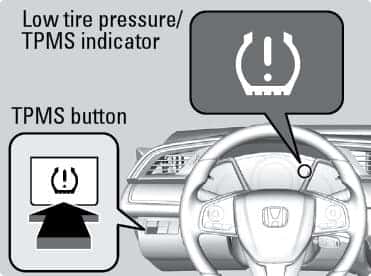
- Press the TPMS reset button (usually located beneath the dashboard or inside the glove box).
- Hold the button until the TPMS light blinks (about 5 seconds).
- Start the engine and drive for at least 10 minutes at speeds above 30 mph.
For Indirect Tpms Models
- Turn on the ignition.
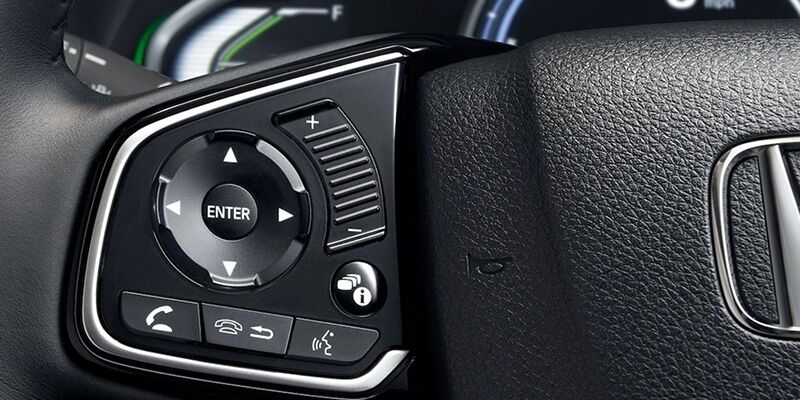
- Go to the vehicle’s menu on the dashboard display.
- Select “Settings,” then “Vehicle,” then “TPMS Calibration.”
- Choose “Calibrate” and confirm.
- Drive normally; the system will recalibrate itself.
| Honda Model | TPMS Type | Reset Method | Where to Find Reset |
|---|---|---|---|
| Honda Civic (2016+) | Indirect | Menu Calibration | Dashboard display |
| Honda CR-V (2014+) | Direct | Physical Button | Under dashboard |
| Honda Accord (2013+) | Direct | Button or Menu | Glove box/Menu |
Step 4: Confirm The Reset
Once you’ve followed the reset steps, the TPMS warning light should turn off. If it stays on, double-check your tire pressures and repeat the reset. Sometimes, driving for 10–15 minutes is needed for the system to relearn.
Common Mistakes When Resetting Honda Tire Pressure
Even experienced drivers make simple errors. Avoid these pitfalls:
- Not checking all four tires: Sometimes only one tire is low, but all should be checked.
- Using the wrong PSI: Always use the recommended value from your Honda, not the tire brand.
- Skipping the reset step: Adding air isn’t enough; the system needs to be told.
- Not driving after reset: The TPMS requires a short drive to finish calibration.
- Ignoring the spare tire: Some Hondas have sensors in the spare, so check it too.
A non-obvious tip: If your TPMS light stays on after several resets, the sensor battery could be dead. These batteries last about 5–7 years and need replacement.
Practical Tips For Maintaining Honda Tire Pressure
Keeping tire pressure correct isn’t just about resetting the system. A few habits can save you trouble:
- Check tires monthly, not just when the light comes on.
- Buy a reliable digital tire gauge for accuracy.
- Avoid checking tire pressure right after driving; heat can give false readings.
- Consider rotating tires every 6,000–8,000 miles to extend their life.
- Watch for slow leaks—sometimes small punctures cause gradual pressure loss.
If you live in a place with cold winters, expect the TPMS warning light in October or November. Cold air shrinks, lowering pressure. A quick refill and reset solves most cases.
How Weather And Driving Habits Affect Tire Pressure
Temperature swings can change tire pressure by 1 PSI for every 10°F. If you park outside, morning readings may be lower than afternoon. Fast driving, heavy loads, or rough roads can also affect pressure.
For example, if you drive a Honda CR-V in Chicago and temperatures drop from 70°F to 30°F, your tires could lose 4 PSI overnight. Always check tires after big weather changes.
Diagnosing Tpms Warning Lights
The TPMS warning light isn’t always about low pressure. Sometimes, it signals a faulty sensor or system error. Here’s how to read the signs:
- Solid light: One or more tires are low.
- Flashing light: Sensor issue or system malfunction.
If the light flashes, resetting won’t fix it. You may need a TPMS sensor replacement or a checkup at your dealer.
What To Do If Reset Doesn’t Work
Sometimes, the reset process fails. Here’s what to try:
- Re-check all tire pressures.
- Repeat the reset steps carefully.
- Drive for 10–15 minutes.
- Inspect the sensors for damage.
- Visit a Honda dealer for a diagnostic scan.
A little-known insight: After a tire shop visit, always ask if they performed a TPMS reset. Many mechanics forget this step, leaving you with a warning light.
Honda Tpms Vs. Other Brands
Honda’s TPMS is reliable, but not unique. Here’s how it compares to other popular brands.
| Brand | TPMS Reset Method | Sensor Battery Life | Menu Calibration |
|---|---|---|---|
| Honda | Button/Menu | 5–7 years | Yes |
| Toyota | Button/Menu | 5–8 years | Yes |
| Ford | Button/Menu | 6–8 years | No |
| Nissan | Button/Menu | 4–6 years | Yes |
Honda’s calibration process is user-friendly, but sensor batteries may require earlier replacement than some competitors.

Credit: www.valleyhonda.com
Resetting Tire Pressure After Tire Replacement
If you get a new tire, the TPMS may not recognize it until you perform a reset. Always ask your mechanic to register the new sensor, especially if you drive a newer Honda. If the warning light stays on, a dealership can use a diagnostic tool to sync the sensor.
How Often Should You Reset Honda Tire Pressure?
There’s no strict schedule, but these guidelines help:
- After every air refill
- After tire rotation or replacement
- Every change of season
- When the TPMS warning light appears
Frequent resets aren’t harmful. They keep the system accurate and help you avoid false alarms.
Credit: www.geraldhondacountryside.com
Saving Money By Maintaining Tire Pressure
Proper tire pressure saves money in several ways:
- Improves fuel economy by up to 3%
- Prevents uneven tire wear, saving on replacements
- Reduces risk of blowouts, saving on repairs
For a Honda Accord, keeping tires at 32 PSI can improve gas mileage by 1–2 miles per gallon compared to under-inflated tires.
Frequently Asked Questions
What Does The Honda Tpms Warning Light Mean?
The TPMS warning light means one or more tires are below recommended pressure. It can also signal a faulty sensor if flashing. Check all tires with a gauge, refill as needed, and perform a reset.
Can I Reset Honda Tire Pressure Without A Reset Button?
Yes. Many newer Honda models use a dashboard menu to calibrate the system. Go to “Settings” > “Vehicle” > “TPMS Calibration” and choose “Calibrate. ” Older models may require a physical button.
How Long Does It Take For The Tpms Light To Turn Off After Reset?
Usually, the light turns off within minutes after a proper reset and drive. In some cases, driving for 10–15 minutes at speeds above 30 mph is needed for the system to recalibrate.
What Should I Do If The Tpms Light Stays On After Resetting?
First, re-check all tire pressures. If the light stays on, repeat the reset process. If it continues, there may be a sensor issue. Visit a Honda dealer for diagnostics.
Does Cold Weather Affect Honda Tire Pressure?
Yes. Every 10°F drop in temperature lowers tire pressure by about 1 PSI. In cold climates, check and adjust tire pressure more often in winter. Reset the TPMS each time you refill.
Credit: www.bianchihonda.com
Final Thoughts
Resetting your Honda tire pressure isn’t hard, but doing it right keeps your car safe and efficient. Always check all tires, use the recommended PSI, and follow the correct reset steps for your model. Don’t ignore the warning light—sometimes it’s a sign of a deeper issue. By staying proactive, you’ll save money, avoid trouble, and enjoy a smoother ride. If you need more details on TPMS systems, visit the National Highway Traffic Safety Administration for expert advice.