Losing or replacing your Chevy key fob can feel frustrating, especially when you think programming it might be complicated or costly. But what if you could do it yourself, quickly and without extra trips to the dealership?
This guide will show you exactly how to program your Chevy key fob step-by-step. By the end, you’ll save time, money, and gain the confidence to handle your key fob like a pro. Ready to unlock this simple skill? Let’s get started.
Credit: www.siddillon.com
Chevy Key Fob Basics
The Chevy key fob is a small device that controls your vehicle remotely. It offers convenience and security. Understanding its basics helps you use it better.
This section covers the types of Chevy key fobs and their common functions. Knowing these details makes programming easier and more effective.
Types Of Chevy Key Fobs
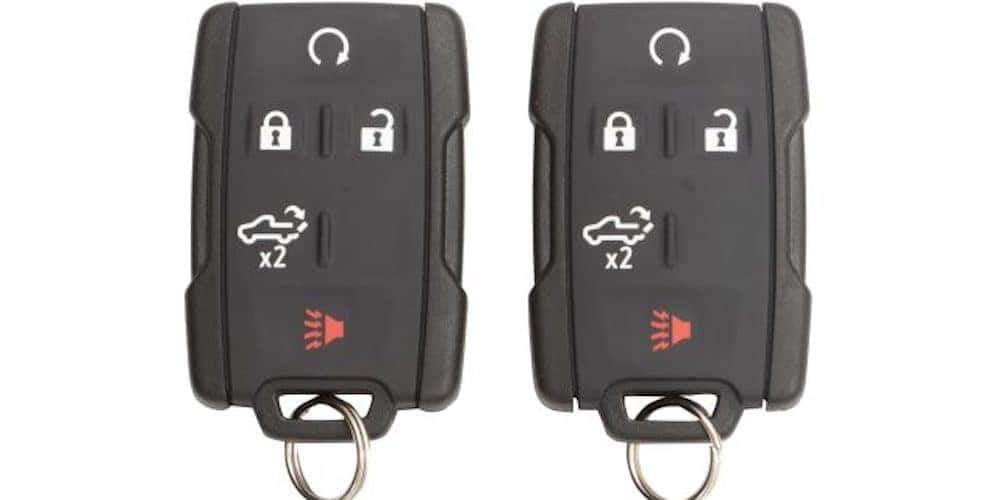
Chevy key fobs come in several types. Some are simple, with only lock and unlock buttons. Others include remote start and trunk release features.
Keyless entry fobs allow you to unlock the car without using a key. Smart key fobs support push-button start systems. Each type fits specific Chevy models and years.
Common Key Fob Functions
Chevy key fobs perform several functions. Lock and unlock doors remotely is the basic use. Most fobs include a panic button for emergencies.
Some key fobs can start the engine from a distance. This feature is helpful in cold or hot weather. Trunk release and remote window control are also common.
Understanding these functions helps when programming or troubleshooting your key fob. It also improves your overall vehicle experience.
When To Program A Key Fob
Programming a Chevy key fob is necessary in several common situations. Knowing when to program your key fob can save time and prevent frustration. This guide covers the main reasons why programming might be needed.
Lost Or Replacement Key Fob
Losing a key fob means you must program a new one to work with your car. Replacement key fobs do not come pre-programmed. They must sync with your vehicle’s system to unlock doors and start the engine.
Battery Replacement Needs
Sometimes, after changing the key fob battery, the remote stops working. The signal may get lost. Reprogramming the key fob restores its connection to your Chevy. This step ensures your remote functions properly again.
Adding Extra Key Fobs
Adding a new key fob to your Chevy requires programming it to your vehicle. This allows the new remote to control your car. It is useful for sharing car access with family or friends.
Preparation Before Programming
Before programming a Chevy key fob, some preparation is needed. This step saves time and avoids errors during programming. Preparing helps ensure the process goes smoothly and the key fob works correctly.
Gathering the right tools, checking if your vehicle supports key fob programming, and making sure the battery is in good condition are important tasks. These steps improve your chances of successful programming.
Gathering Necessary Tools
Start by collecting all tools needed for programming. You will need the new key fob, your vehicle’s owner’s manual, and the existing programmed key fob. A working key fob helps the vehicle recognize the new one. Some models may require a small flathead screwdriver or a key to access programming mode.
Checking Vehicle Compatibility
Not all Chevy models allow key fob programming at home. Check your vehicle’s year and model in the owner’s manual. Confirm the key fob is compatible with your vehicle. Using the wrong key fob can cause programming failure or damage. Verify if dealer assistance is necessary for your model.
Ensuring Battery Health
Make sure the battery in the new key fob is fresh and fully charged. A weak battery may stop programming midway. Check the battery in the existing key fob too. Replace batteries if they are old or weak to prevent interruptions during programming.
Step-by-step Programming Guide
Programming a Chevy key fob is simpler than many expect. This guide walks through each step clearly. Follow closely to sync your key fob with your vehicle.
Every step matters. Skipping one can stop the fob from working properly. Stay patient and move step-by-step.
Entering Programming Mode
Start by sitting in the driver’s seat with all doors closed. Insert the key into the ignition and turn it to the “On” position without starting the engine. Turn the key back to “Off” and remove it quickly. Repeat this On-Off cycle three times within five seconds. The doors will lock and unlock automatically, signaling you entered programming mode.
Syncing The Key Fob
Press any button on the key fob within 10 seconds of entering programming mode. The door locks will cycle again to confirm the fob is syncing. If you have additional remotes, press a button on each one now. Wait for the locks to cycle after every press. This step adds all key fobs you want to program.
Testing The Key Fob Functions
Exit programming mode by opening the driver’s door. Stand outside and press the lock and unlock buttons on the fob. Check if the doors lock and unlock properly. Test other buttons like the trunk release and panic alarm. If any button does not respond, repeat the steps carefully.
Troubleshooting Common Issues
Troubleshooting common issues helps fix problems during Chevy key fob programming. Many users face errors that stop the process. Knowing how to solve these problems saves time and effort.
Issues often come from simple causes. Checking these first can avoid frustration. Below are frequent problems and ways to handle them.
Key Fob Not Responding
Sometimes, the key fob does not react to button presses. This can happen if the fob is damaged or out of range. Try pressing the buttons closer to the car. If it still does not work, the fob might need repair or replacement.
Another cause is interference from other electronic devices. Move away from strong signals like Wi-Fi routers or other key fobs. Test the fob again in a quiet area.
Programming Mode Failure
Entering programming mode is essential to program the key fob. Failure to enter this mode stops the process. Ensure the car’s ignition is turned on and off correctly. Follow the steps exactly as described in the manual.
Delays between steps can cause failure. Complete each action quickly but carefully. If the problem persists, try restarting the car and retrying the sequence.
Battery And Signal Problems
Weak or dead batteries often cause issues. Replace the key fob battery with a fresh one. Check the battery type in the manual for the right fit.
Signal problems can also block communication. Make sure no objects block the fob’s signal to the car. Metal or thick cases can weaken the signal. Remove any covers that may interfere.
Alternative Programming Options
Programming a Chevy key fob might seem tricky. Some owners prefer simple do-it-yourself steps. Others need different choices to program their key fobs. These alternative options can save time and effort. They help when basic programming fails or when you want extra help.
Using A Professional Locksmith
A locksmith can program your Chevy key fob quickly. They have the right tools and skills. Locksmiths come to your home or office. This saves a trip to the dealership. Their service is often cheaper than a dealer. They can also fix key or lock issues.
Dealership Programming Services
Dealerships offer expert programming for Chevy key fobs. They use official software and tools. This guarantees 100% compatibility with your car. The staff can check your car’s security system. Dealers may also replace faulty key fobs. This service can cost more but ensures quality.
Aftermarket Programming Tools
Aftermarket tools let you program your key fob at home. These devices connect to your car’s OBD port. They guide you through the programming process step-by-step. These tools are reusable for many cars. They require some basic understanding but save dealer visits.
Tips For Maintaining Your Key Fob
Maintaining your Chevy key fob helps it work longer and better. Small care steps avoid many common problems. Follow these simple tips to keep your key fob in top shape.
Regular Battery Checks
Check the battery often to avoid sudden failure. A weak battery makes the key fob less responsive. Replace the battery as soon as the signal weakens. Use the correct battery type for your model. Keep spare batteries handy for quick swaps.
Protecting The Key Fob From Damage
Avoid dropping the key fob on hard surfaces. Keep it away from water and extreme heat. Use a protective case to prevent scratches and cracks. Do not expose it to strong magnets or heavy pressure. Store the key fob safely when not in use.
Software Updates And Compatibility
Check for software updates to ensure full compatibility. Some key fobs need updates for new car features. Visit your dealer or use official apps for updates. Outdated software may cause malfunction or limit functions. Stay informed about your car’s system changes.

Credit: www.youtube.com

Credit: www.sternbergchevrolet.com
Frequently Asked Questions
How Do I Program A Chevy Key Fob Myself?
To program a Chevy key fob, enter your vehicle and close all doors. Insert and remove the key from the ignition twice. Press any button on the fob until the locks cycle. Programming is complete once the locks respond.
Can I Program Multiple Key Fobs At Once?
Yes, you can program multiple key fobs. After entering programming mode, press each fob button in sequence. The locks will cycle to confirm each fob is programmed. Up to four remotes can be programmed at once.
What If My Chevy Key Fob Doesn’t Program?
If programming fails, check the battery in your key fob. Ensure all vehicle doors are closed during programming. Repeat the procedure carefully. If it still doesn’t work, visit a dealership for assistance.
Is Programming A Chevy Key Fob Free?
Programming a Chevy key fob at home is free. Dealerships may charge a fee for programming services. Using your owner’s manual can save time and money by guiding you through DIY programming.
Conclusion
Programming a Chevy key fob can save time and money. The steps are simple and clear to follow. You only need a few tools and patience. Always check your car’s manual for specific instructions. Double-check the process to ensure your key fob works correctly.
This guide helps you avoid extra trips to the dealer. Now, you can feel confident handling key fob programming. Keep your key fob safe and enjoy the convenience it brings.